
Meta Lead CRM
Bring enquiries from connected Meta Instant Forms into LeadCatch. Your team can see the answers and, when available, the source ad before deciding how to follow up.
See where an enquiry came from
From form to follow-up
- 01
Qualify leads with Meta Instant Forms
Build a Meta Instant Form with questions that help you decide how to follow up, such as what someone wants and when they need it.
- 02
Review the enquiry
The CRM shows contact details and submitted answers. Where source information is available, you can see the ad or form that brought in the lead.
- 03
Keep follow-up organised
Move leads through pipeline stages and keep your notes with the enquiry. Where alerts are enabled, opt in to a daily or weekly digest. Team and Agency can also opt in to per-lead alerts.
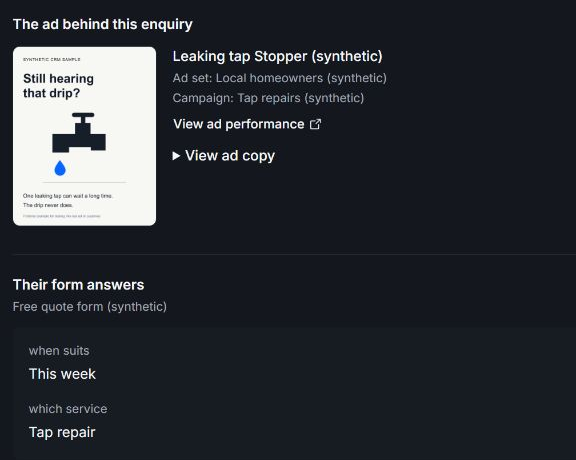
What gets imported
The paid-plan CRM imports leads from connected Meta Instant Forms. Source details and alert timing depend on the information Meta supplies and when the lead is imported.
Start the conversation by email
Send a first email after a new enquiry from an enabled Meta form. Invite the customer to explain what they need or share useful details with them. Your team can check the send status alongside the enquiry in the CRM.
Explore automatic lead repliesTake your leads with you
To request a machine-readable export of your CRM leads, write to support@leadcatch.com from the email address on your account.
Guides and support
Related features
 Meta Ad Creator
 Video Ads
 Automatic Lead Replies
 Meta Ads Strategy
 AI Advisor & Performance
 Articles
Plans that include this feature
A subscription for the platform. Meta bills your ads to your own card, and we take nothing from that.
Solo
One business, one person.
€79per month
billed yearly
or €99 a month, billed monthly
Team
A business with a team behind it.
€159per month
billed yearly
or €199 a month, billed monthly
AgencyAfter launch
Heavy volume, or client work.
€399per month
billed yearly
or €499 a month, billed monthly
Contact us